
16 Screen Golf Data Metrics Every Golfer Should Know
When you take a swing at a screen golf facility or driving range, various shot metrics such as ball speed, distance, and spin rate appear on the screen. However, many golfers tend to focus only on a few familiar numbers, such as ball speed, distance, and sidespin, while overlooking the rest of the data. Understanding what these 16 screen golf metrics mean and how they affect your shots can make screen golf much more enjoyable and turn it into a more systematic practice experience.
Key Data Displayed on the Main Screen
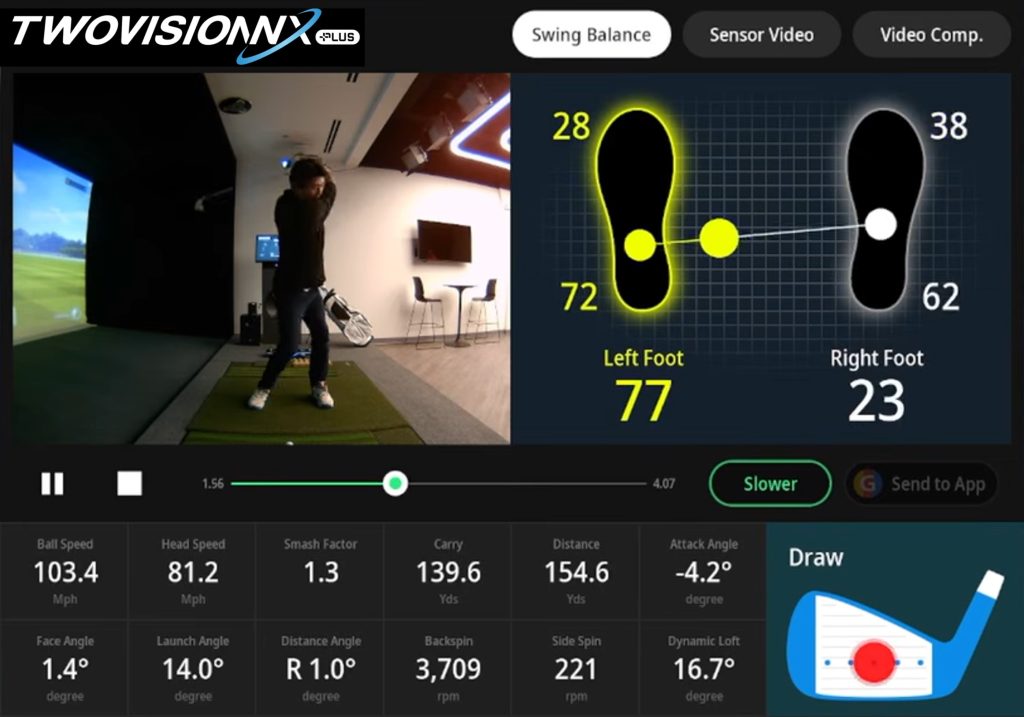
The main screen in screen golf displays shot data such as ball speed, head speed, launch angle, face angle, direction angle, backspin, sidespin, APEX, left/right distance, and roll. On the floor screen, face angle, club path, and face-to-path allow golfers to check the direction of the clubface at impact, the swing path, and the difference between the two.
Together, these screen golf metrics provide information about impact efficiency, distance, direction and trajectory, spin, and club movement. Let’s take a closer look at what each metric means and how it can be used to analyze your shots.
Speed and Impact Efficiency Metrics: Ball Speed, Head Speed, Smash Factor
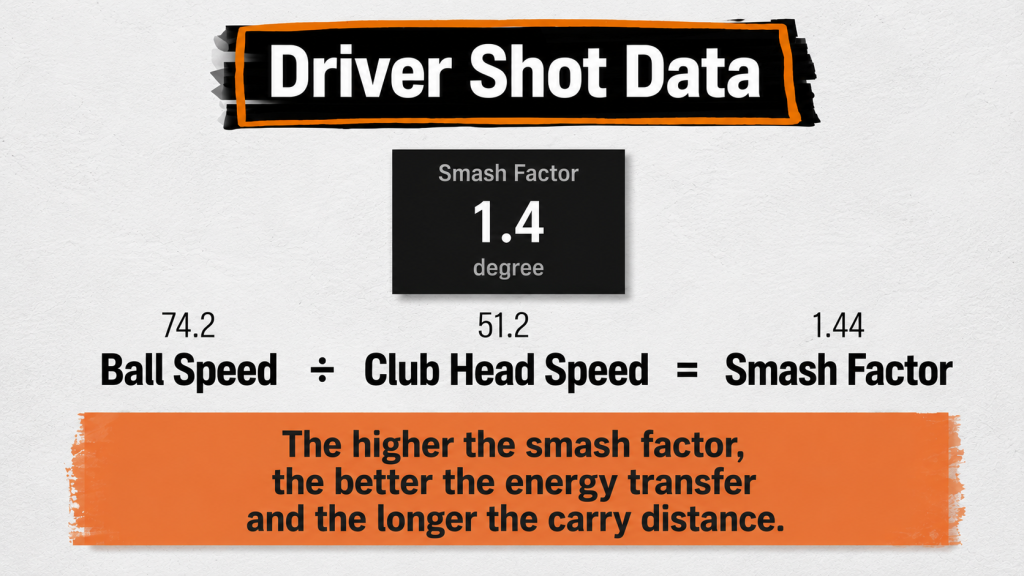
- Ball Speed: The speed at which the ball travels
- Head Speed: The speed of the clubhead at the moment it makes contact with the ball
- Smash Factor: Ball Speed ÷ Head Speed, an indicator of impact efficiency; around 1.4 is considered a good level for a driver
Ball speed refers to how fast the ball travels, while head speed is the speed of the clubhead at the moment it makes contact with the ball. Smash factor is calculated by dividing ball speed by head speed and indicates how efficiently energy is transferred to the ball. For a driver, a smash factor of around 1.4 generally indicates solid impact.
For example, if your head speed is 40 m/s and your ball speed is 56 m/s, your smash factor is 1.4. If you swing at the same head speed but produce a ball speed of only 48 m/s, your smash factor is 1.2. This means that relatively less energy has been transferred to the ball compared with the speed of the club, so it may be worth checking the quality of your contact and impact.
Understanding the relationship between head speed, ball speed, and smash factor can help you evaluate the efficiency of your impact.
Distance and Impact Data: Carry, Total Distance, Roll, Attack Angle
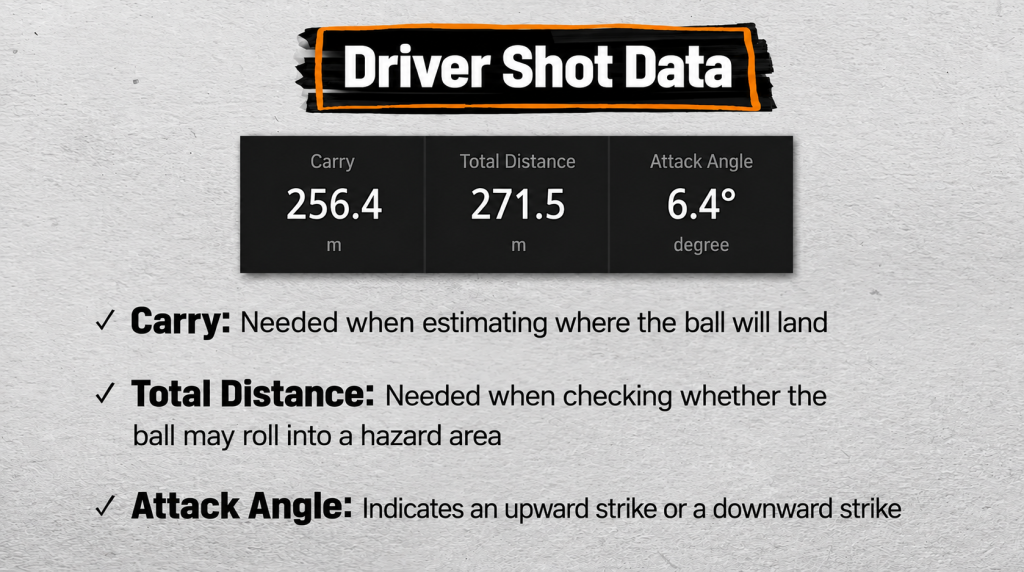
- Carry: The distance the ball travels from launch until it first touches the ground
- Total Distance: The total distance traveled by the ball, including the distance it rolls after landing
- Roll: The distance the ball travels after landing until it comes to a complete stop
- Attack Angle: The angle at which the clubhead is moving upward or downward at the moment of impact
Carry is the distance the ball travels before first touching the ground. Many golfers tend to focus mainly on total distance, but knowing your carry distance is essential for planning shots more accurately on the course. For example, carry is the key measurement when determining whether your ball can clear a bunker or hazard or reach the fairway. This is why professional golfers also use carry distance as a benchmark when practicing with a driver.
Total distance includes both carry and the distance the ball rolls after landing. Knowing both carry and total distance allows you to estimate how far the ball will roll, assess the possibility of reaching a bunker or hazard, and plan your shot accordingly to avoid them. Understanding both carry and total distance for each club can therefore help you navigate the course more safely and accurately.
Roll is the distance the ball travels after first touching the ground until it comes to a complete stop. Subtracting carry from total distance shows how far the ball rolled after landing—in other words, the roll.
Attack angle indicates the degree to which the clubhead is moving upward or downward at the moment of impact. A positive value indicates an upward strike, while a negative value indicates a downward strike. Drivers generally tend to produce an upward strike, while irons tend to produce a downward strike. If the shaft is leaning back at impact, it produces an upward strike, while a shaft tilted to the left produces a downward strike. If your downward strike is too steep, you can practice by feeling as though the clubhead is moving through the impact zone a little faster and observe how your attack angle changes. Adjusting your attack angle in this way can help you practice more effective impact.
Direction and Trajectory Metrics: Face Angle, Launch Angle, Direction Angle, APEX
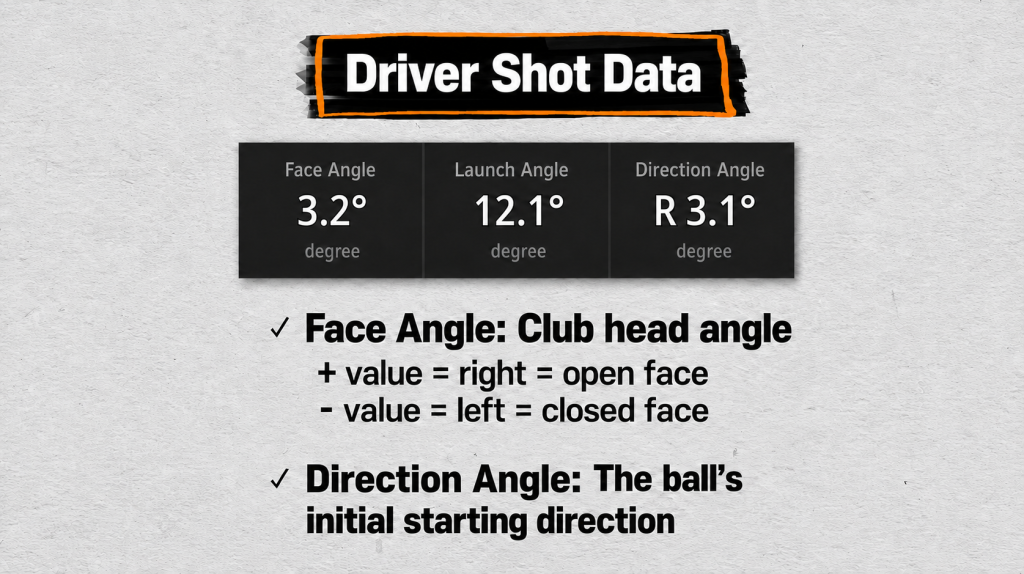
- Face Angle: The angle of the clubface relative to the target. 0 degrees indicates square, while a positive value indicates the face is pointing right and a negative value indicates it is pointing left, corresponding to an open or closed position.
- Launch Angle: The angle at which the ball initially launches, which can be used to adjust trajectory
- Direction Angle: The angle at which the golf ball initially travels
- APEX: The highest point the ball reaches during flight
Face angle indicates the direction in which the clubface is pointing relative to the target. A value of 0 degrees means the face is square, while positive values indicate the face is pointing to the right and negative values indicate it is pointing to the left. Positive and negative values can therefore help you determine which direction the clubface is pointing. However, the direction in which the ball actually curves is influenced not only by face angle but also by factors such as club path and face-to-path, so it is best to consider these metrics together.
Launch angle is the angle at which the ball initially takes off. If you want to launch the ball higher, you can practice increasing the launch angle. If the trajectory is too high and you are losing distance, you can work on lowering the launch angle—such as by lowering the tee or making the club more upright—to adjust the trajectory. Generally, an appropriate launch angle is around 12–15 degrees for a driver and around 15–19 degrees for a 7-iron.
Direction angle indicates whether the ball initially starts to the left or right of the target immediately after impact. It shows the ball’s initial starting direction. When considered together with face angle, club path, and face-to-path, it can help identify what caused the ball to start in a particular direction and why it subsequently curved.
APEX is the highest point the ball reaches during flight. While launch angle describes the angle at which the ball initially leaves the clubface, APEX shows how high the ball actually travels. For a driver, approximately 20–30 meters is generally considered an appropriate range, although this can vary depending on launch angle, ball speed, spin rate, and other factors. APEX can help you determine whether your overall ball flight is too high or too low.
Swing Path and Shot Shape Metrics: Club Path, Face-to-Path
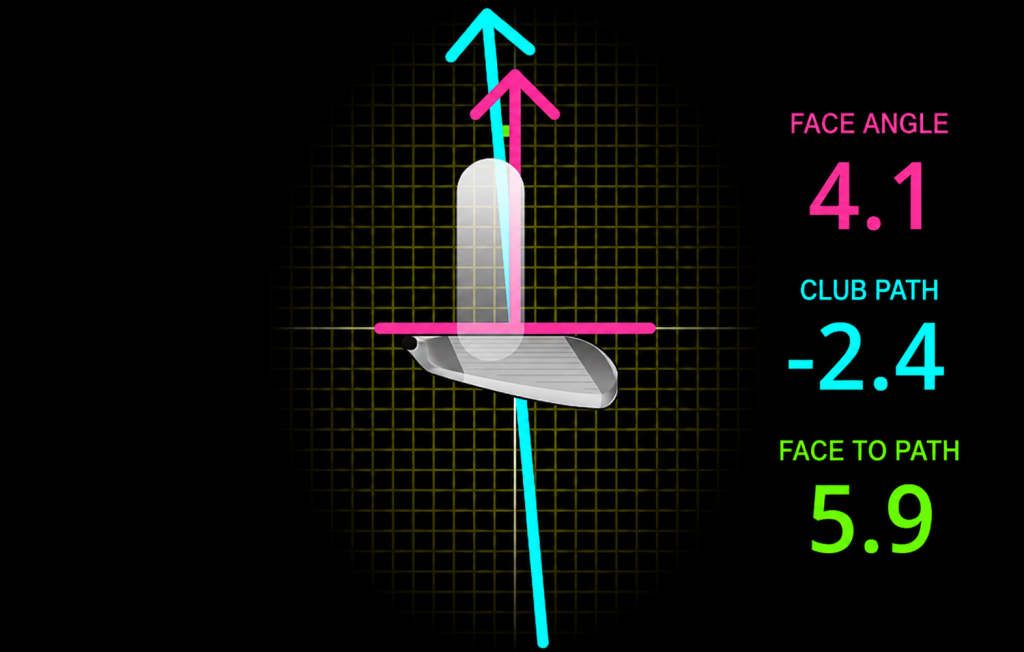
- Club Path: A metric showing the direction in which the clubhead is moving relative to the target line at the moment of impact
- Face-to-Path: The degree to which the clubface is open or closed relative to the club path, used to analyze how the ball curves to the left or right
Club path shows the direction in which the clubhead is moving relative to the target line at the moment of impact. It can be used to determine whether the club is traveling from inside to outside, known as in-to-out, or from outside to inside, known as out-to-in. By looking at face angle and club path together, you can compare the direction in which the club is moving with the direction the clubface is pointing at impact and better understand what is creating your shot shape. A positive value indicates movement to the right, while a negative value indicates movement to the left.
Face-to-path represents the difference between the club path and face angle at the moment of impact. It shows how open or closed the clubface is relative to the direction of the club path and can be used to analyze why the ball curves left or right, as in a draw or fade. Generally, the closer the value is to 0 degrees, the smaller the difference between the club path and the direction of the clubface.
Using these metrics together can help reduce slices and hooks and improve directional control.
Spin and Loft Metrics: Backspin, Sidespin, Dynamic Loft
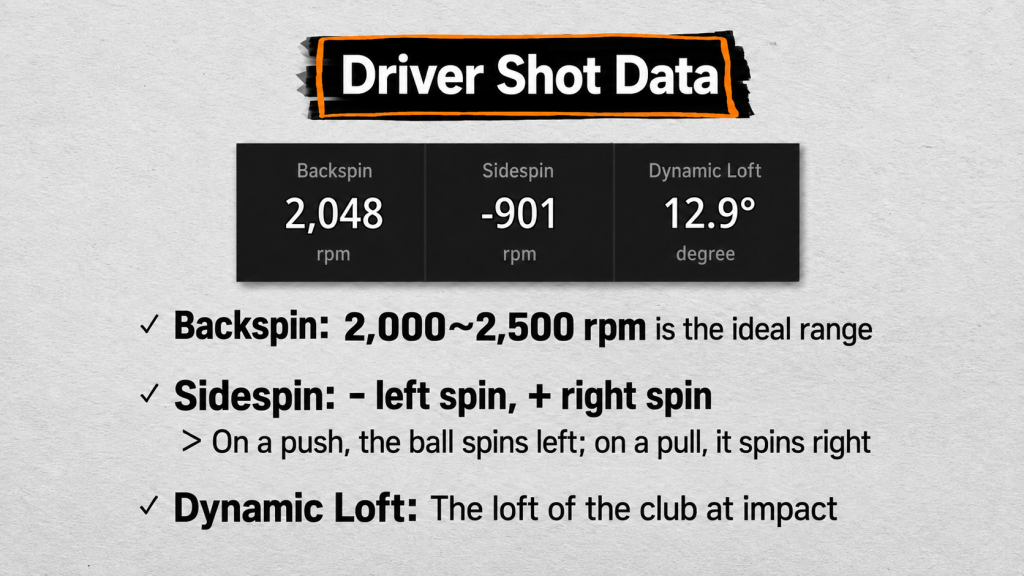
- Backspin: A measure of how much the ball spins backward
- Sidespin: The ball’s rotation to the left or right
- Dynamic Loft: The actual angle of the clubface at impact
Backspin is the most important of these three metrics because it affects the ball’s lift and stability in flight. For a driver, 2,000–2,500 rpm is considered the most stable range. If backspin is too high, increased resistance can reduce distance, while too little backspin can cause the ball to drop too quickly. If your backspin is high, you can experiment with different impact positions during practice and observe how the backspin value changes.
Sidespin refers to the ball’s lateral rotation. A positive value indicates rotation to the right, while a negative value indicates rotation to the left. These positive and negative values show the direction of the ball’s rotation, while the direction and amount of sidespin can affect how much the ball curves to either side. If negative values appear repeatedly, you can check whether you are producing a pushing motion, while repeated positive values may indicate a pulling motion.
Dynamic loft is the actual angle of the club at the moment of impact. It is related to launch angle: launch angle is the angle at which the golf ball actually takes off, while dynamic loft refers to the angle of the club. The golf ball typically launches at an angle lower than the angle of the clubface.
So far, we have looked at what these 16 screen golf data metrics mean using driver shots as the main reference. Now, let’s apply the same screen golf data to iron shots and see how they can be analyzed.
Iron Swing Data Analysis
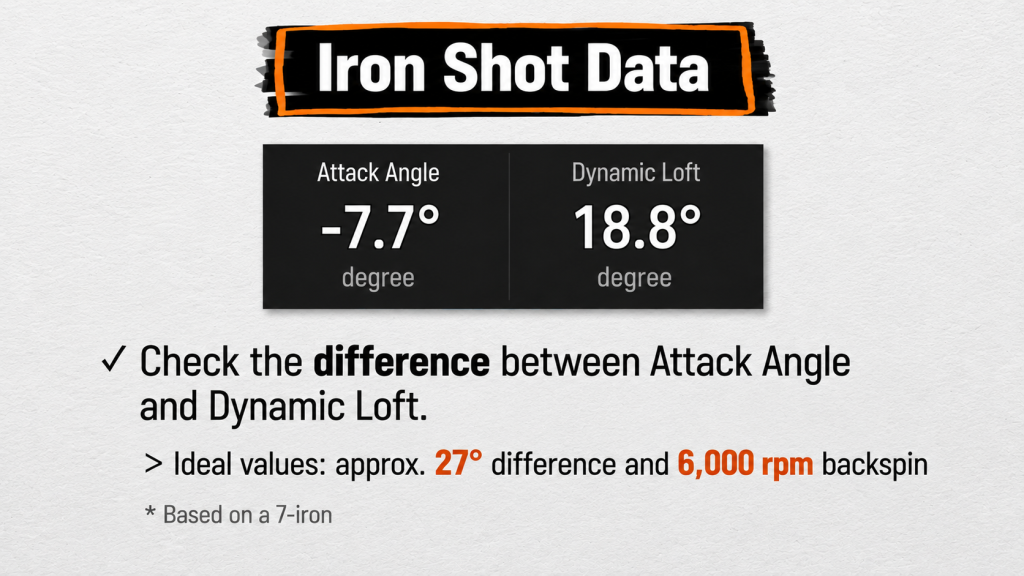
For irons, ball speed, head speed, and smash factor are also important metrics. A typical smash factor for an iron is around 1.3. This is lower than the driver benchmark of around 1.4 because irons generally have more loft than drivers, which results in a lower smash factor.
The attack angle for an iron is generally negative, indicating a downward strike. Comparing attack angle with dynamic loft can help you examine changes in impact and backspin. In professional shot data, a difference of around 27 degrees can sometimes be observed. Keeping the difference between attack angle and dynamic loft in mind can be useful when practicing.
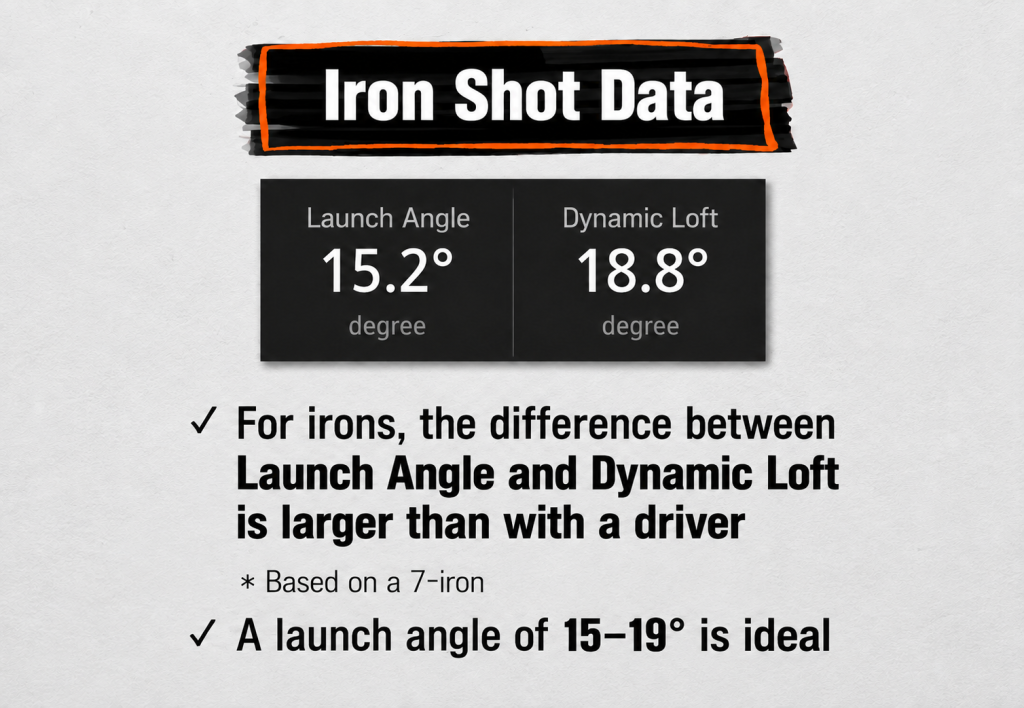
Launch angle is also an important indicator of iron trajectory. For a 7-iron, a launch angle below 20 degrees is considered desirable, while an angle of 15 degrees or lower can indicate insufficient trajectory.
Rather than simply playing a round, practicing while analyzing your swing, distance, and direction based on shot data can help you improve your golf skills more effectively. By understanding and using the different metrics and concepts in GOLFZON screen golf data, you can make your practice more meaningful and enjoy your rounds even more.
Related Content

[COLUMN] The Future of the Golf in the AI Era – Interview with GOLFZON’s Jang Cheol-ho
As AI-powered services and technologies continue to emerge across industries, GOLFZON GROUP, a global total golf platform company, is exploring new ways to bring AI into the golf…
More to Explore
[COLUMN] The Future of the Golf in the AI Era – Interview with GOLFZON’s Jang Cheol-ho
As AI-powered services and technologies continue to emerge across industries, GOLFZON GROUP, a global total golf platform company, is exploring new ways to bring…

GOLFZON Connects at The Open
During The 154th Open at Royal Birkdale, GOLFZON GROUP met with leading organizations and partners from across the global golf industry to exchange views…

Zoom In! GOLFZON AMERICA ② “Welcome to Wow”
People who experience a GOLFZON simulator for the first time all say the same thing: ‘Wow.’ In September 2025, GOLFZON AMERICA made ‘Wow’ the…

CITY GOLF FAQ ③ The Global Response to CITY GOLF as It Expands Worldwide
Q1. What has the response to CITY GOLF been like overseas? At the ‘2026 PGA Merchandise Show’ held in Orlando, USA in January 2026,…